Flip Component
Overview
Flip Component flips a selected component end-to-end by swapping its first two assembly joint constraints. This is useful for quickly reorienting components such as duct fittings, pipe segments, or other parts with symmetrical ends.
When you select a component, the command checks if it has at least two assembly joints. If so, it swaps the first two joints, causing the component to flip end to end. If the component has fewer than two assembly joints, no action is taken.
If the component is grounded or otherwise constrained in a way that prevents movement, Inventor may display “Sick” assembly joints indicating conflicts.
How It Works
- Select the component you want to flip.
- If the component has at least two assembly joints, the first two joints are swapped.
- Inventor updates the component position based on the new joint ordering.
Usage Instructions
- Open your assembly in Inventor.
- Click Flip Component in the Placement panel.
- Select the component to flip when prompted.
- Verify the component flipped end-to-end.
Troubleshooting
- No change occurs: Ensure the component has at least two joints.
- “Sick” joints appear: Resolve grounding/constraint conflicts and try again.
Examples
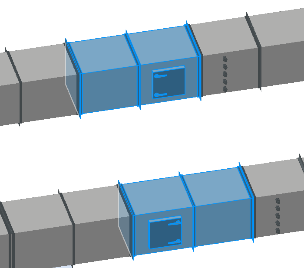
In the snip below, the lower fitting with the clean out door has been flipped end to end. Note the adjacent duct fitting to the right with test ports is not affected.